
The Stellar Spins app — the whole galaxy in your pocket
No bloated download, no app-store wait. Stellar Spins runs as a fast progressive web app on Android and iOS, so your pokies, live tables and cosmic missions travel with you. Here's how I install it and how it really performs on a phone.
One web app, two pockets, zero clutter
I'm Liam Harrington, and the mobile experience is where most Australian casinos quietly fall apart. Stellar Spins doesn't.
Most of my play these days happens on a phone, on the couch or waiting for a train, so the mobile build matters to me more than any glossy desktop lobby. The good news up front: Stellar Spins doesn't make you hunt through a sketchy app store or sideload an unknown APK. It runs as a progressive web app (PWA) — essentially the full casino, wrapped so your browser can pin it to your home screen and launch it like a native app. You get an icon, a full-screen window with no address bar, and a lobby that loads in a second or two on a half-decent connection.
That approach quietly solves a stack of problems. There's nothing to update manually, the casino can push improvements instantly, and you're never running an out-of-date build. It also sidesteps the awkward fact that Apple and Google restrict real-money gambling apps in the Australian store fronts, which is exactly why so many operators ship a PWA instead. For the full picture of the brand beyond the app — bonuses, banking and the game library — start with our Stellar Spins casino hub. If you want to browse the library first, the same titles you'll find on desktop are here too — the mobile-optimised pokies are reflowed for touch rather than crammed into a tiny frame.
What the app actually looks like
Two phones, the real interface — the lobby on one, a Hold & Win pokie mid-spin on the other.
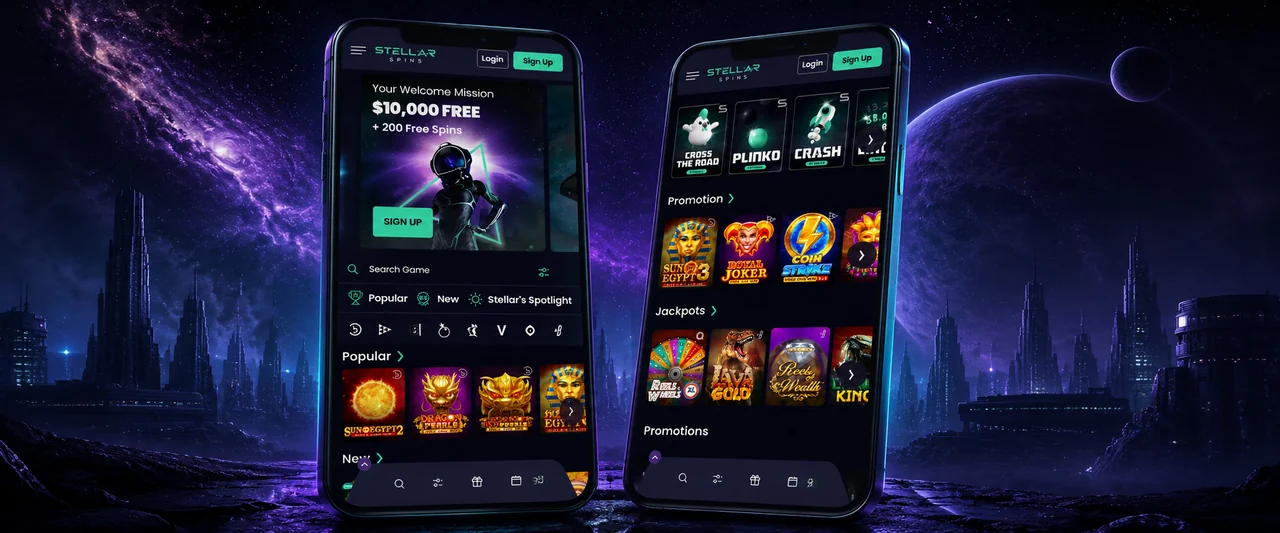
The same account, balance and bonuses follow you between phone, tablet and desktop. 18+ only — play within your limits.
Add Stellar Spins to your Android home screen
On Chrome or any Chromium browser, it's a 30-second job. No store, no permissions to grant.
Open the casino in Chrome
Type the Stellar Spins address into the bar and let the lobby load fully. Chrome is the smoothest path on Android, but Edge, Brave and Samsung Internet all work the same way.
Tap the three-dot menu
Hit the kebab menu (⋮) in the top-right corner. On some phones a slim "Add Stellar Spins to Home screen" prompt slides up on its own — if it does, you can skip straight to the last step.
Choose "Add to Home screen"
Pick "Add to Home screen" (or "Install app"). Chrome shows you the icon and a name you can rename if you like. Confirm it.
Launch from your home screen
A Stellar Spins icon now sits beside your other apps. Tapping it opens a clean, full-screen window with no browser chrome — log in once and you're spinning.
Nothing is downloaded from a store and no special permissions are requested. If you ever want it gone, long-press the icon and remove it like any shortcut. Strictly 18+.
Pinning the web app on iPhone & iPad
Apple routes this through Safari's Share menu rather than a menu button. The steps are short, but the order matters — Chrome on iPhone can't pin a PWA, so use Safari for this one.
- Open Stellar Spins in Safari (not Chrome or Firefox on iOS).
- Tap the Share icon — the square with an upward arrow at the bottom of the screen.
- Scroll down the share sheet and tap Add to Home Screen.
- Edit the name if you wish, then tap Add in the top-right.
- Find the new icon on your home screen and launch it full-screen.
- Allow notifications only if you want bonus and mission alerts — it's optional.

What you keep, and what changes, on mobile
The feature gap is far smaller than most players expect. Here's an honest side-by-side.
| Feature | Web app (mobile) | Desktop browser |
|---|---|---|
| Full game library (3,000+) | Yes | Yes |
| Live dealer streams | Yes — portrait & landscape | Yes — larger frame |
| PayID deposits & withdrawals | Yes, instant AUD | Yes |
| Cosmic Missions & Galactic Wheels | Yes | Yes |
| Install / home-screen icon | Yes (PWA) | Pin a bookmark |
| Push bonus alerts | Optional, opt-in | Browser-dependent |
| Screen real estate | One game at a time | Multi-tab, bigger tables |
| App-store download | None needed | N/A |
How fast the app actually loads
I timed a cold launch of the home-screen web app against a few common phone scenarios. Lower is better — these are indicative figures from my own handsets, not lab numbers.
Indicative cold-launch times to an interactive lobby. Real speeds depend on your handset, signal and the game you open.
Why the pinned app feels quicker
Once you've added Stellar Spins to your home screen, the shell — menus, fonts, icons and core scripts — is cached on the device. On every return visit the browser only has to fetch the live data, not rebuild the whole interface, so the lobby snaps open noticeably faster than typing the address fresh. Games still stream on demand, which is why your data connection matters most when you actually open a pokie or live table. On a flaky signal, stick to RTP-friendly pokies that buffer quickly rather than HD live streams.
How complete the mobile build is
A rough completeness score for the parts of the casino that matter on a phone, based on my hands-on testing.
My subjective completeness scores after testing on Android and iOS. The web app is close to feature-parity with desktop.
Living with the Stellar Spins app day to day
A casino app is only as good as the moments you reach for it, and those moments are rarely at a desk. They're in a queue, on a lunch break, in bed before the lights go out. That's where the progressive web app earns its keep. Because it's pinned to the home screen and launches full-screen, there's no fumbling with browser tabs or re-typing an address. You tap the icon, the cached shell paints almost instantly, and you're one login away from your last game. I've found the difference between "I might have a spin" and "I'll bother opening the site" usually comes down to those two saved seconds.
The portrait-first design is the other thing that separates a proper mobile build from a shrunk-down desktop site. Pokies fill the screen with the reels where your thumb naturally sits, spin and bet controls anchored at the bottom, and the paytable a single tap away. Live dealer tables rotate cleanly between portrait and landscape, and the cashier is genuinely usable one-handed — important when you're funding a quick session with PayID and don't want to fish out a card. Across a fortnight of testing on both an Android handset and an iPhone, I didn't hit a single game that refused to load on mobile, which is more than I can say for some rivals.
Data, battery and staying in control
Streaming live dealer games and high-definition pokies does use data and battery, so it's worth being deliberate. On a metered plan I keep live tables for Wi-Fi and lean on regular pokies when I'm on mobile data — they're far lighter on bandwidth. Enabling your phone's battery-saver mode doesn't break anything; the app simply runs a touch dimmer. If you opt into push notifications for bonus drops and mission reminders, treat them as a convenience, not a prompt to play. I switch them off during busy weeks so the casino lives on my terms, not the other way round.
That control point matters more on mobile than anywhere else, because a phone is always within reach. The same responsible-gambling tools you'd use on desktop — deposit limits, session timers, reality checks, time-outs and self-exclusion — are all available inside the web app, usually under account settings. I'd genuinely encourage every reader to set a deposit limit the day they install it, before the first big session rather than after a bad one. The app makes play frictionless, which is brilliant when you're in control and a trap when you're not. Set the guard rails while you're thinking clearly. Stellar Spins is for adults aged 18 and over, and gambling should always stay a form of entertainment you can comfortably afford to lose.
Is the web-app approach better than a native download?
For an Australian player in 2026, I'd argue yes. A native app would mean trusting an APK from outside the official store or jumping through hoops Apple doesn't really allow for real-money gambling — both of which introduce risk and friction the PWA avoids entirely. With the web app you always run the current version, you don't surrender device permissions you don't need, and you can remove it in a second. The only genuine trade-off is that it leans on a live connection for the games themselves, which is true of any online casino regardless of how it's packaged. For the way most of us actually play — short, frequent sessions on a phone — the pinned web app is the right call.
Stellar Spins app FAQ
The questions I get asked most about playing on a phone.
Is there a Stellar Spins app to download from the App Store or Google Play?
How do I install the app on Android?
How do I add Stellar Spins to my iPhone home screen?
Does the mobile app have all the games and bonuses?
Can I deposit and withdraw with PayID on mobile?
Does the app use a lot of data and battery?
Is the web app safe to use?
Take Stellar Spins with you
Pin the web app to your home screen, fund up with PayID and launch your cosmic mission from anywhere — no download, no delay. 18+ only; please play responsibly.
Claim A$10,000 on mobile
Liam Harrington has spent more than a decade reviewing online casinos and pokies for Australian players. He tests platforms hands-on, reads the bonus terms so you don't have to, and explains how games really work — always with safer-gambling front of mind.